
For most Kenyan adults, the word token brings to mind a meter bill. Maybe it is the water meter, or the KPLC prepaid box beeping when the units run low. Maybe it is the round yellow parking coin you get when you park at Sarit Center. Cambridge Dictionary lists several meanings for the word token, from a symbol of feeling, to a substitute for money or a voucher, to a piece of data in computing. AI borrows that last meaning, and once you understand it, you start noticing the meter running in every prompt you send. Understanding tokens helps you use AI tools with intention, so that every time you press enter, your prompt does the most work for the least resource.
Forget the tech jargon for a moment. A token is simply how an AI reads text. It does not read word by word the way you do. It reads in letter clusters, breaking language into small pieces before it can process anything. The exact rules a model uses to chop up text vary and can be case sensitive, but the rough guide holds across most tools. One token is roughly three to four characters.
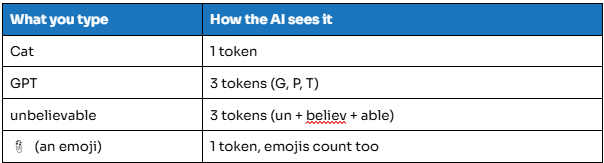
Notice that Cat stays whole while GPT breaks into three separate pieces. That small difference adds up fast once you move from single words to full paragraphs.
Why This Weird Chopping Matters to You
Tokens Are Money
Every AI tool charges by the token, not by the question and not by the chat. It counts the exact number of text fragments processed. Your prompt costs tokens. The AI's response costs tokens. That ten page PDF you pasted in without a second thought? Hundreds of tokens gone before the AI has even answered you.
You might ask, Tim, why should I care? Because tokens are invisible. Most AI tools do not show you a running meter the way KPLC shows you units on your statement. Without that visibility, it is easy to run up a bill without realizing it. The meter is always running, even when you cannot see it.
Tokens Are Memory, and Memory Has a Hard Ceiling
Think of the context window, the AI's short term memory for your conversation, as a whiteboard with limited space. Every message you send, every file you paste, and every response the AI gives you gets written on that board. Ask an AI to help with a quarterly report and you might start by dumping fifteen thousand words of raw sales data. Then you add your hypothesis, paste supporting emails, ask for Excel formulas, draft a Word report, and finally request PowerPoint slides. Each step eats up space. The AI does not store any of this in a filing cabinet. It holds everything in active memory, and that memory has a hard ceiling measured in tokens.
When the whiteboard fills up, the oldest writing gets erased silently. The AI will not gasp or warn you. It will simply stop remembering the original data you fed it in turn one, while confidently building your final slides from whatever remains. Your Nairobi sales spike slide might end up citing the wrong cause, because the AI forgot the Excel verification you did three turns earlier. This is not a bug. It is how these models work. The context window is a rolling buffer, not an archive, and treating it like one is the fastest way to produce confident nonsense.
Tokens Are Speed
The more tokens involved in a chat, the slower the response. Every token the AI generates requires computation. It is not pulling a pre written answer off a shelf, it is calculating each word on the fly. A short yes costs almost nothing. A two thousand word market analysis costs thousands of tiny calculations stacked end to end, and you feel every one of them while you wait.
A Case Study, Building a Quarterly Sales Report
Here is how this plays out in practice. You open ChatGPT with six months of raw sales data, forty thousand rows sitting in Excel, and one goal, a polished PowerPoint ready for Friday's board meeting.
Turn 1, “Here is my raw data”
You paste a fifteen thousand word dump of sales figures, dates, regions, product lines, and notes. The AI reads it all. Context used, roughly 20,000 tokens. Window remaining, plenty.
You ask if it can identify any patterns. It tells you Q2 spiked in the Nairobi region, Q3 dipped in the Mombasa region, and there seems to be a correlation between promotional spend and unit sales. You feel good. The AI “remembers” everything.
Turn 2, “Let's test my hypothesis”
You paste your theory that the Nairobi spike was driven by a new hire rather than the promotion. You add three thousand words of supporting emails and competitor pricing data from that quarter, then ask whether the data supports this.
The AI responds that the Nairobi spike correlates more strongly with the promo launch on March 15 than with the hire date on April 2, though retention rates did improve after the hire. Context used so far, about 28,000 tokens. Still fine.
Turn 3, “Build me the Excel model”
You ask the AI to generate formulas, pivot tables, and conditional formatting rules. It outputs two thousand tokens of step by step instructions. You follow along and paste back your first draft, five thousand tokens of formulas and results, then ask it to check your SUMIFS.
It flags that your Mombasa region filter is pulling from the wrong column. Context used, about 38,000 tokens. Getting tight.
Turn 4, “Now draft the Word report”
You ask for an executive summary. The AI writes three thousand words. You paste it into Word, edit it, then paste your revised draft back and ask for something more concise with a risk section added. Context used, about 48,000 tokens.
Turn 5, time for the PowerPoint
You ask for ten slides covering the title, agenda, data story, hypothesis test, Excel findings, risks, and recommendations, based on everything discussed so far. The AI starts generating, then tells you it can only reference the last 15,000 tokens of the conversation and asks you to re paste the earlier sections.
Or worse, it does not tell you at all. It confidently builds slides from whatever it still remembers, which is your recent Word edits, not the original data dump. Your Nairobi spike slide now cites the wrong cause, because the AI forgot the Excel verification you did in turn three.
Where the Example Fails
Tokens Are Money
The workflow assumes you can freely paste massive datasets, revised drafts, and back and forth edits without tracking cost. A fifteen thousand word raw data dump, hypothesis context, Excel formulas, Word drafts, and PowerPoint requests, all inside one continuous chat, racks up tokens fast. Most users on free or low tier plans would hit rate limits or unexpected charges before reaching slide five. The workflow treats token spend as invisible, which it never is.
Tokens Are Memory
The workflow assumes the AI retains perfect recall across all five turns. In reality, by turn four or five, the original data dump has likely been pushed out of the context window on most standard models. The AI keeps responding helpfully, but it is synthesizing from summaries and recent edits rather than the raw data itself. The Excel findings you verified in turn three become unreliable by turn five, because the verification context is gone.
Tokens Are Speed
The workflow assumes instant responses across all five turns. In practice, generating a three thousand word report or processing a large data paste creates noticeable lag. Each token is computed in sequence, the AI cannot skip ahead. A user waiting several seconds per turn for heavy outputs loses flow, makes errors, or abandons the task altogether.
The Disciplined Approach
Here is the same quarterly report, built with token discipline instead. Instead of one long chat, you run five short ones, each with a single job.
Chat 1, data analysis only
You paste a one thousand word summary of your raw data, not the full dump, covering key metrics, regions, and timeframes. You ask the AI to identify patterns and flag anomalies. It replies with a five hundred word findings summary. You copy that summary and close the chat.
Chat 2, hypothesis test only
You open a fresh chat, paste the AI's own summary from Chat 1, add your hypothesis in two hundred words, and ask for a verdict. The AI responds with a three hundred word analysis, supported or refuted, with reasoning. You copy it and close the chat.
Chat 3, Excel build only
Open a fresh chat again, paste the hypothesis verdict, and ask for specific formulas, one SUMIFS, one pivot table structure, one conditional formatting rule. The AI gives you four hundred words of copy pasteable code. You execute it in Excel yourself, with no paste backs, then close the chat.
Chat 4, Word report only
Open a fresh chat, paste your own two hundred word bullet outline rather than a full draft, and ask the AI to expand it into eight hundred words of executive prose. You paste the result into Word and edit offline, with no revision loops inside the chat.
Chat 5, PowerPoint only
Open a fresh chat one last time, paste your final Word executive summary, and ask for ten slide titles with one line bullets, nothing more. The AI gives you the slide scaffolding, and you build the deck yourself in PowerPoint.
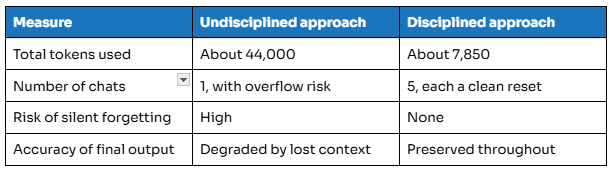
Best Practices to Take With You
- Give each chat one task, and start fresh when the topic changes.
- Summarise instead of dumping. A tight summary does more work than a wall of raw text.
- Carry outputs forward. Let a chat's summary feed directly into the next one.
- Edit offline. Do not paste a revised draft back into the same chat and ask for more rounds.
- Be specific. Ask for ten slide titles and bullets, not make my deck.
- Close the chat once the task is done. Finished means finished.
Just like your KPLC token, AI tokens are prepaid, finite, and they burn faster than you think. The difference is that KPLC gives you a beep when you are running low. AI gives you silence, and then a confidently wrong slide. The people who master AI are not the ones who write the longest prompts. They are the ones who know exactly what belongs on the whiteboard, and when to wipe it clean.